CREity · broker training · built inside a working brokerage
Learn CREity in an afternoon.
CREity runs a brokerage's sales, leasing and lead pipelines on one board, with a lease lifecycle for every suite — not every building. This course gets a new broker productive in about thirty minutes, then goes deep on every module so the system does the remembering for you.
Quick start · ~30 min10 modules · deep referenceCaptured in the live SandboxUpdated September 2026
A note on names. The product is CREity. Inside the app, screens still read “MGC CRM” — the rename is rolling through the product. Same system, same buttons; only the label differs.
Start here
Quick start
Six steps. Sign in, create your first deal, add a property, log activity, set commission, and set up your week. Check them off as you go — progress saves in this browser.
Every screen, in the order a broker meets it: the board, properties and suites, the lease ledger, people and leads, market data, syndication, commissions, the assistant, and the week.
Do these six things in order, in the Sandbox first if you like. When you finish, you will have a live deal on the board with a commission attached, a property behind it, and your week laid out.
Progress: 0 of 6 complete
THE MODULES
Every screen, in the order you meet it.
Each module states the goal, where to click, what CREity computes for you, and a pro tip. Screenshots come from the live Sandbox; a few AI-assisted lessons are marked and will be captured as soon as the Sandbox's AI credits are restored.
MODULE 01
Orientation: one board, three pipelines
Understand how CREity is organised so you always know where a record lives.
The layout
Pipeline — All Deals, Leads, Leasing, Sales, BPO / Appraisals, Lead Routing, Tasks.
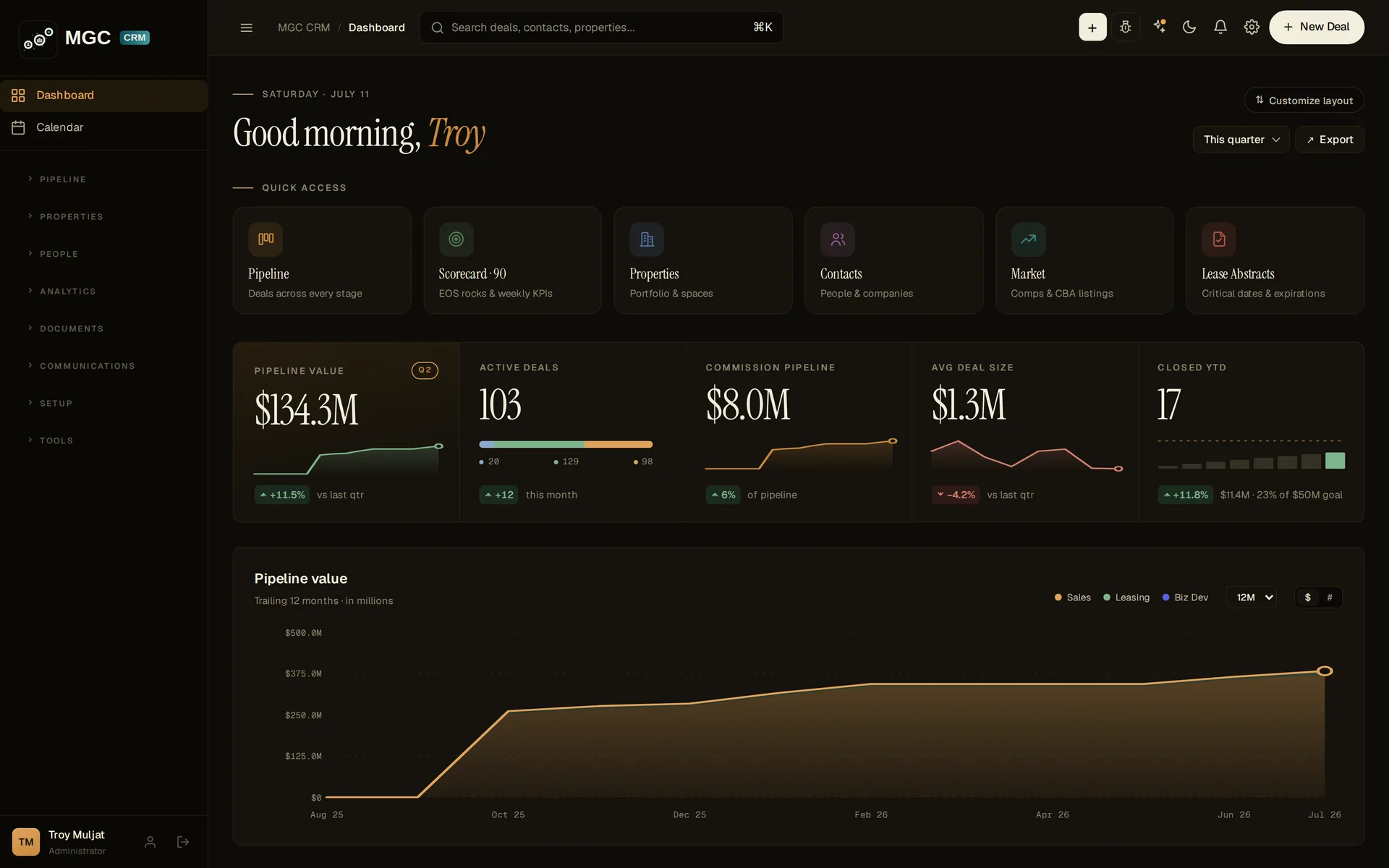
What CREity computes for you: every dashboard figure. Pipeline value is active-open only; commission pipeline is the sum of each deal's computed commission; the renewal radar (30 / 60 / 90 / 120 / 180 days / 12 mo) reads lease expirations straight off the suite records.
Pro tip:⌘K is the fastest way around. Type a street, a tenant, or a person and jump straight to the record.
MODULE 02
The board and the deal page
Create, read and move deals — the record the whole shop reads.
The board
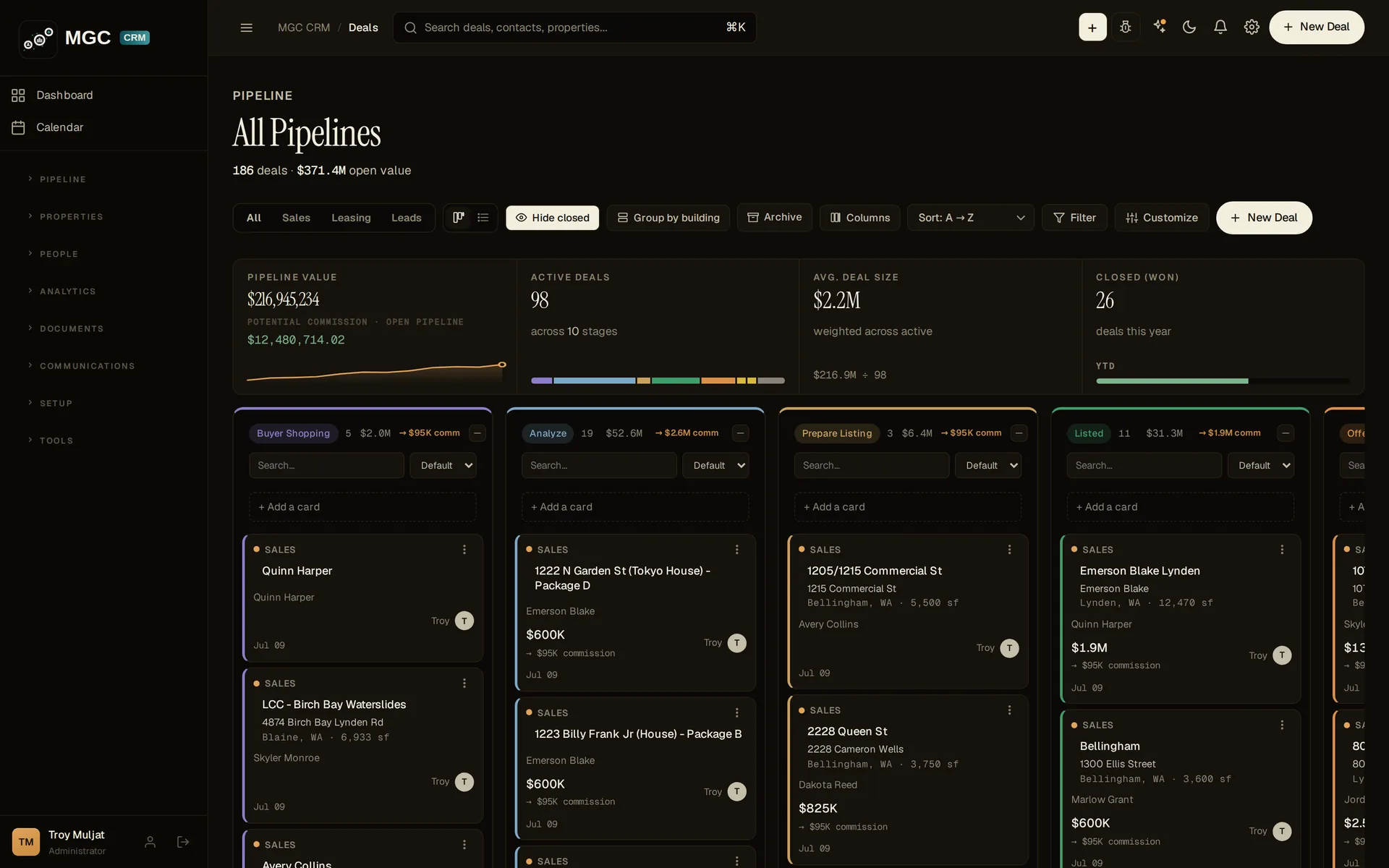
All Deals shows every pipeline side by side. Filter with the All / Sales / BPO / Leasing / Leads tabs, switch board or list view, Group by building, or Hide closed.
Sales stages run Would Sell → Analyze → Prepare Listing → Listed → Offer / Negotiation → … (eleven in total). Each column has its own search and + Add a card.
Removed deals go to Archive and restore in one click.
Creating a deal
Click + New Deal anywhere in the app.
Choose Pipeline and Starting stage.
Name it address – type; add Estimated value. Property, if it exists, can be searched; if not, choose + New property.
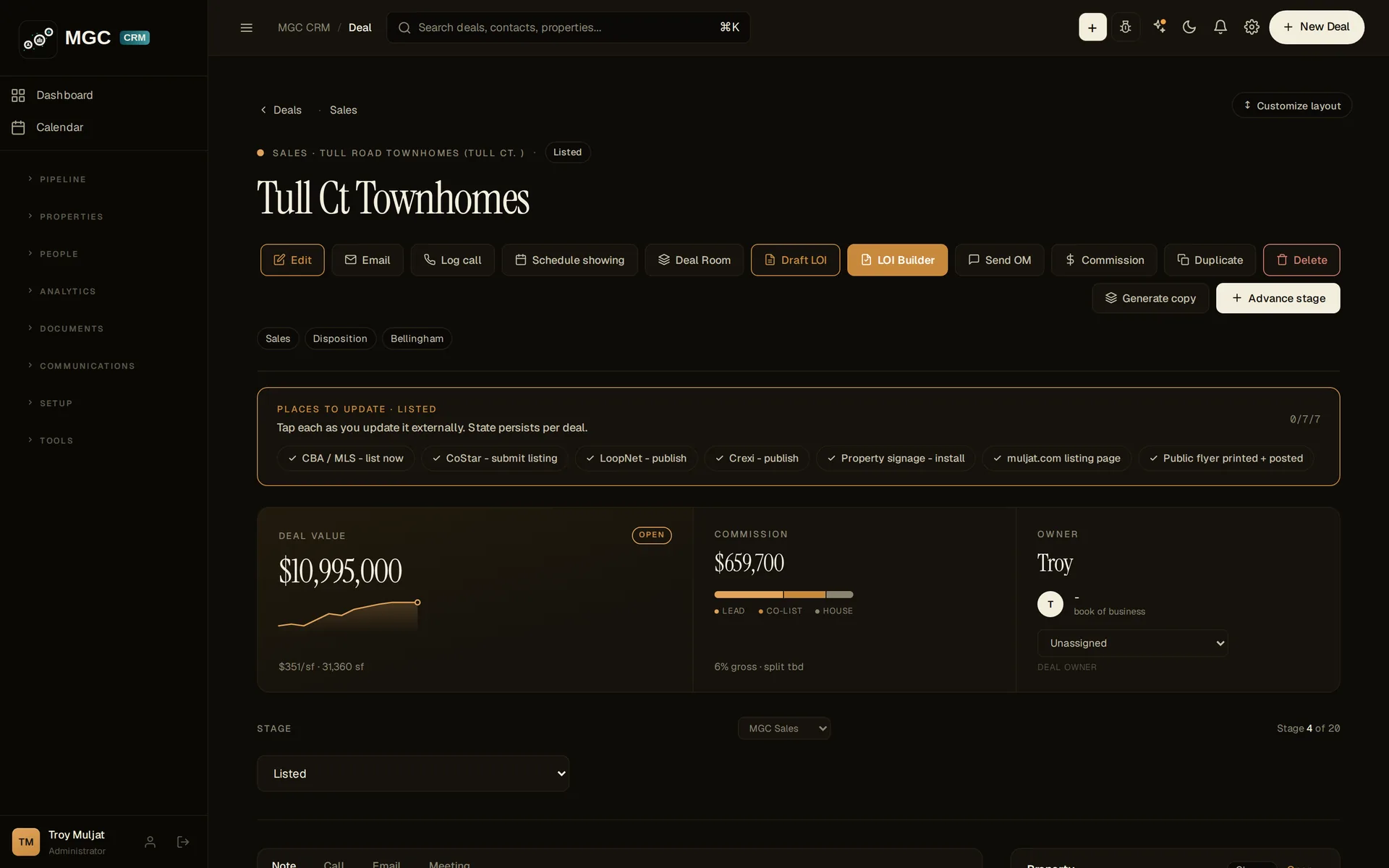
Three cards: Deal value (with trend), Commission (pre-computed, split bar), Owner (book of business).
Stage control: a dropdown showing Stage 2 of 11, plus the pipeline it belongs to.
Activity logger: Note / Call / Email / Meeting tabs with dictation; a running Notes list beneath.
Right rail: Property (Link), Contacts on this deal (+ Add), Offering Memorandum views.
What CREity computes for you: the commission from value × rate the moment a value is set; deal value trend; stage position; OM view counts.
All Pipelines board — stage columns, filters, hide-closed, group by buildingNew deal — pipeline, starting stage, name, property, source, valueDeal page — action row, value / commission / owner, stage, activity logger
Pro tip: name deals consistently (address – type). The board, the search and the comps all read cleaner for it.
MODULE 03
Properties, suites and the stacking plan
A building is not one deal. Model every suite so rollover, WALT and rent roll compute themselves.
Properties under watch
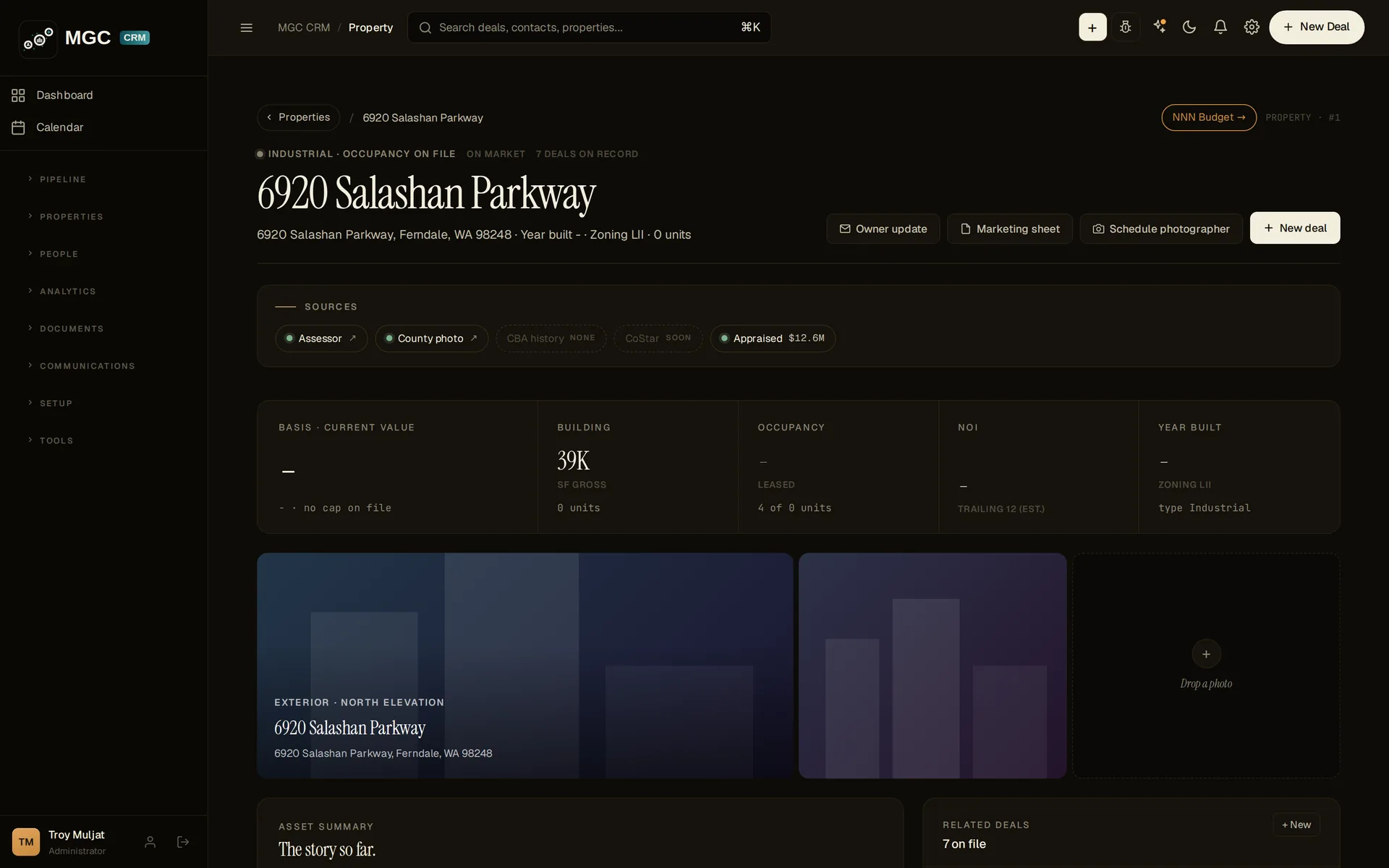
Properties lists every building in your database, with portfolio totals: assets, gross SF, units, tenants, occupancy, value.
Filter by county, city, type (Retail / Office / Industrial / MF), status (For Sale / For Lease / Sold / Leased) and building size. Toggle Table / Gallery; the Atlas maps what is geocoded.
+ Add property creates the record; parcel, owner and coordinates come from the nationwide parcel service (Regrid), not from typing.
Suites and the lease lifecycle
Each suite runs its own eight-stage lifecycle — from Analyze through Listed and Lease Signing to Collect. Bind a deal to a suite and the two stay in step.
The stacking plan draws floor by floor, block width to scale, coloured by expiry year. Occupancy, vacant SF, WALT and average in-place rent are computed from the suites.
Lease dates live on the suite. Abstracts, the commission ledger and the renewal radar all read from it.
What CREity computes for you: occupancy, vacant SF, WALT, rent roll, average in-place rent — all from the suite records. The property's Spaces table is the single source of truth for dates.
Properties under watch — portfolio totals, filters, table and AtlasStacking plan — floor by floor, coloured by expiry year
Pro tip: add suites before you add leases. Once the suite exists, a lease PDF files its dates straight onto it.
MODULE 04
Leasing and the lease ledger
Get every lease's clock into the system so renewals, options and expirations never slip.
The Lease Ledger
Open Lease Abstracts. The ledger headline tells you how many abstracts are under management, the scheduled annual rent, and how many roll inside 90 days.
Forward rolloff charts 24 months of expirations by month, colour-banded 0–90, 91–180, 181–365, 365+ days.
Cards summarise Active, Expiring · 90 days, and Holdover & MTM; tabs filter All / Active / Expiring 90d / Holdover / Expired.
Adding a lease AI · pending credits
At the top of the ledger, optionally link the lease to a property and suite so its dates auto-file to the space.
Click Upload lease PDF. The abstractor distils tenant, rent schedule, escalations, term, options and critical dates into a new abstract.
The expiration lands on the suite; empty commission fields fill from rent × term (a number you already typed is preserved).
What CREity computes for you: abstract-to-suite date filing, renewal radar windows, holdover status, and the leasing commission from the abstracted rent and term.
Lease Ledger — “Every clock, still ticking”: rolloff chart, Active / Expiring / Holdover, upload lease PDFAn abstracted lease — parties, rent schedule, options, critical dates (captured once AI credits are restored)
Pro tip: the ledger's Expiring · 90 days card is your renewal desk. Work it every Monday.
MODULE 05
Contacts, companies and leads
Keep people first, and let standing search criteria surface matching listings.
Contacts and Companies are people-first records: buyer / tenant cards show price, asset type and area at a glance. Link them to deals from the deal page's Contacts on this deal → + Add.
Leads is its own pipeline. Give a lead shopping criteria (type, size, area, budget) and matching market listings appear on the deal — and in search.
Re-engage Leads resurfaces contacts that have gone quiet. Lead Routing assigns inbound leads to the right broker.
Email intake auto-files messages to a matching deal by CC.
What CREity computes for you: lead ↔ listing matches from the market feed; re-engagement candidates; routed assignment.
Pro tip: fill shopping criteria on every buyer and tenant lead. It turns the market feed into a matching engine that works while you are out on tours.
MODULE 06
Market and property data
Use the data that is already in the system instead of a second subscription.
Market (Comps & CBA listings): thousands of live commercial listings from the Commercial Brokers Association feed, reloaded weekly.
Listings: the subset of your properties you are actively marketing.
Parcel data: nationwide via Regrid — parcel number, owner, boundaries and coordinates, pulled not keyed. An admin pastes the Regrid token under Integrations.
Northwest Trends: load the CSV on the Integrations or Market page.
Comps: closed-won deals become sale and lease comps automatically, with price per square foot. No second database.
Traffic you keep: listing-traffic figures are archived permanently, when CBA, CoStar and Crexi keep only rolling 7 / 30 / 90-day windows.
What CREity computes for you: $/SF on every closed deal; listing matches; the permanent traffic archive for renewal conversations.
Market — live CBA listings and compsComps — out of your own book
Pro tip: honest boundary — there is no CoStar integration. A CoStar export is loaded by hand.
MODULE 07
Syndication and marketing
Know where a listing has to go the day it goes live — and where to take it down.
Advance a deal to Listed. The deal page prints the syndication checklist: CBA and the MLS, CoStar, LoopNet, Crexi, the sign, the website, the flyer.
Tick items off on the deal itself, so the next person sees what is still out there.
Close or Withdraw and the same list flips to the take-down version.
From the same page: Send OM (offering memorandum + QR), Deal Room (click-accept confidentiality agreement with a signer log), Draft LOI / LOI Builder, and Generate copy.
What CREity computes for you: the stage-driven checklist and its take-down flip; OM view counts.
Syndication checklist on a Listed deal — flips to take-down on close
Pro tip: this is the feature brokers recognise first, because it is the one nobody writes down.
MODULE 08
Commissions
See the money on every deal without a spreadsheet.
The Commission card computes gross commission from deal value and rate the moment a value exists (e.g. $2,850,000 × 6% = $171,000).
Click Commission in the action row to set the Lead / Co-list / House split; the bar on the card updates.
On leasing deals, empty commission fields fill from the abstracted rent × term.
The commission pipeline on the dashboard and the production leaderboard read from these records.
What CREity computes for you: gross commission, split shares, the firm-wide commission pipeline, the leaderboard.
Honest boundary: there is no automated commission-split ledger. Splits and invoicing are tracked and reported; nothing posts itself into your accounting system.
Commission card — $171,000 at 6% gross, split bar
MODULE 09
The assistant AI · pending credits
Ask your book questions, and turn notes and voice into records.
Open the assistant from the top bar. It is scoped to your CRM and to commercial real estate; when the data is not there it says so.
Switch between Grok and Claude from the panel.
Meeting notes in, assigned tasks out — paste notes and get a task list.
Voice entry for a new deal on the drive back from a tour.
Lease PDFs abstracted into tenant, rent, term, options and critical dates (module 4).
The assistant — sandboxed to your book, Grok / Claude switch (captured once AI credits are restored)
Pro tip: ask “what expires in the next 90 days?” — the answer is computed from live rows, not guessed.
MODULE 10
The week, and admin
Run the shop's week from one calendar — and set the workspace up right.
The week
Tasks — assigned to a person, with in-app and email notification.
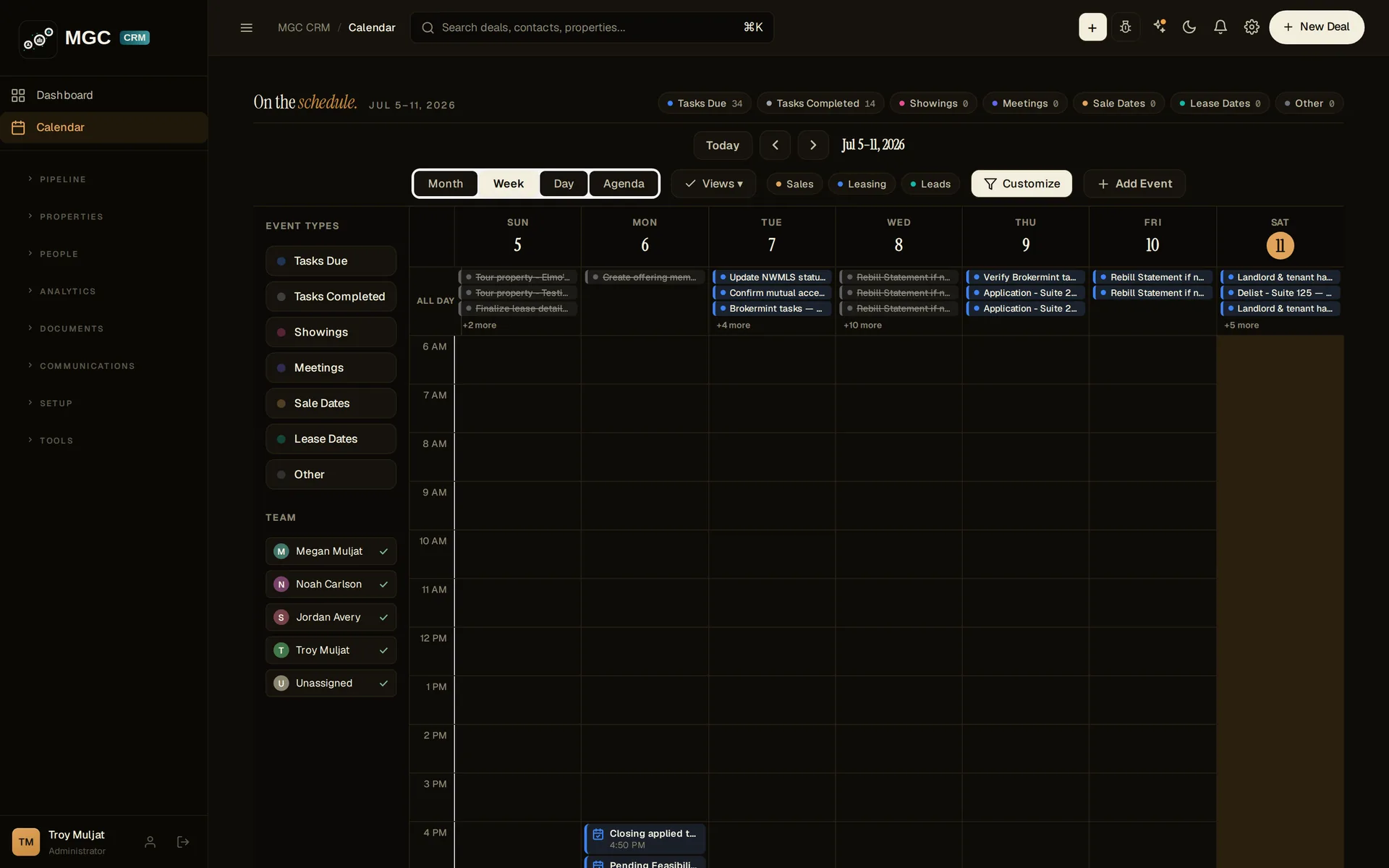
Calendar — tasks, showings, meetings, sale dates and lease dates on one grid, filtered per teammate.
Action plans — templates fire a checklist when a deal changes stage; edit one deal's plan without touching the template.
KPIs / Scorecard — an EOS scorecard with eleven KPIs pulled from the pipeline, frozen weekly. Rocks track quarterly priorities.
Admin and integrations
Team — invite brokers, admins and assistants (admins and assistants are free seats).
Integrations — every connection with its live row count, including the ones switched off. Paste the Regrid token; load the Northwest Trends CSV; connect Dropbox.
Access Hub — keys, lockboxes, gate and alarm codes indexed across the portfolio.
Audit log — database triggers write every change to an append-only log with a SHA-256 hash chain. Rewriting history breaks the chain.
KPIs / Scorecard — EOS scorecard, frozen weeklyCalendar — one grid for the whole shopIntegrations — every connection with its live row count
Pro tip: new workspace? Do Integrations first. Parcel data and market data light up everything else.